
Was leistet der Manager?
Übersicht
Der Manager ist ein mächtiges Werkzeug, das Ihnen viele Anwendungsmöglichkeiten bietet. So können Sie damit
-
umfangreiche Datenbestände beherrschen
-
aber auch Routinevorgänge kleineren Umfangs erledigen
-
im Team arbeiten
-
systematische Suchen und Volltextsuchen (letztere über Ihren gesamten Datenbestand) durchführen
-
mehrere Bildschirme einsetzen
-
Daten im Dateisystem oder auf Servern speichern
-
verschiedene Dateiformate unter einer Oberfläche verwalten
-
einen integrierten PDF-Editor nutzen
-
die Out-of-Band-Funktion bei PDF-Dokumenten einsetzen
-
Schlagwörter nutzen
-
gefilterte Abfragen durchführen
-
elektronische Akten anlegen und paginieren
und anderes mehr.
Mehrere Hilfen erleichtern Ihnen den Einstieg in und die Arbeit mit dem Manager, so
-
eine umfangreiche Hilfefunktion (abzurufen über das Fragezeichen oben rechts)
-
das in 6. Auflage erschienene Normfall-Buch (erhältlich über www.normfall.de oder in jeder Buchhandlung)
-
Video-Clips bei YouTube (abrufbar über die die Website www.normfall.de)
-
Lerntrainer im Internet (abrufbar über die die Website www.normfall.de)
Im Folgenden konzentrieren wir uns auf zwei zentrale Anwendungsmöglichkeiten:
-
die Beherrschung von Komplexität und
-
die Verarbeitung und Erzeugung von Texten
Sie können Komplexität beherrschen
Komplexität ist überall
Komplexität ist heutzutage überall vorhanden. Ihre Kennzeichen sind: Eine Mehrzahl von hierarchischen „Mehr-oder-Minder“-Aspekten befindet sich untereinander in Systemzusammenhängen, wobei die Systeme eigendynamisch sind. Man kann eine Vielzahl von möglichen Zielen verfolgen, wobei Konflikte und Widersprüche zwischen verschiedenen Zielen auftreten. Und so gut wie immer sind Informationsdefizite vorhanden.
Praktisch jeder beruflich relevante Text weist diese Merkmale auf. Nehmen Sie als Beispiel ein Besprechungsprotokoll, das in einem Strafverfahren eine Rolle spielt. Es enthält viele unterschiedliche Informationen. Da ist die Namensliste der Teilnehmer. Diese traten in unterschiedlichen Rollen auf, als Unternehmensangehörige, Rechtsanwälte, Wirtschaftsprüfer… Weitere Personen haben das Protokoll zur Ansicht erhalten und abgezeichnet oder Randbemerkungen darauf notiert. Wieder andere Personen sind in dem Protokoll erwähnt. Später werden daraus Parteien, Beschuldigte, Anwälte, … Die Tagesordnung enthält verschiedene Punkte. Diese wurden kontrovers diskutiert. Die einzelnen Argumente sind festgehalten. Es wurden Entscheidungen getroffen. Auch das Datum ist wichtig, ebenso der Name des Protokollführers. Später, u. U. nach vielen Jahren, erweist sich die juristische Relevanz des Papiers. Es kann verfahrensentscheidende Bedeutung haben.

Komplexität bereitet Schwierigkeiten
Komplexität bereitet uns Menschen Schwierigkeiten. Unsere Sprache ist ein eindimensionales System, das in seiner Linearität die Vieldimensionalität von Komplexität nur unzureichend erfassen kann. Zwischen der Erstellung eines Textes und dem späteren Zugriff auf die darin enthaltenen Informationen liegen zeitliche, personelle und sachliche Barrieren.
Am Beispiel des eben erwähnten Besprechungsprotokolls sei dies verdeutlicht. Es ist zunächst nur zur Information der Teilnehmer und zur Archivierung bestimmt. Jahre später kann es aber plötzlich in einem Strafverfahren relevant werden (zeitliche Barriere). Die Teilnehmer haben keine oder keine genaue Erinnerung mehr an das Treffen und die Erinnerungen daran divergieren; andere Personen (Polizeibeamte, Rechtsanwälte, Staatsanwälte, Richter, …) waren bei dem Treffen nicht dabei gewesen (personelle Barrieren). Bei der Lektüre wissen sie noch nicht, in welcher Anwendungssituation (Ermittlungsbericht, Schutzschrift, Anklageschrift, Beschuldigten- oder Zeugenvernehmung, …) sie das Protokoll später benötigen werden. Und es steckt irgendwo tief verborgen in einem Aktenkonvolut, das aus vielen Ordnern oder Festplatten besteht (sachliche Barrieren).
Bislang gab es keine Hilfen
Bislang gab es zur Überwindung der genannten Schwierigkeiten keine wirklich effektiven Hilfen. Die farbigen Klebezettel werden rasch selbst zum Problem. Die Fertigung von Kopien schafft neue Probleme. Die OCR-isierung (= die Speicherung von Texten mit Texterkennung) hilft nur, soweit aussagekräftige Suchbegriffe relevant sind, deren Zahl nicht zu groß sein darf. Sie funktioniert weder sicher noch schnell. Es gibt aber Situationen, in denen man den Zugriff auf einen Text – genauer: eine bestimmte Textstelle – sekundenschnell und zuverlässig durchführen muss, so etwa während einer Vernehmung vor Gericht.
Die folgende Abbildung verdeutlicht die Vieldimensionalität des genannten Besprechungsprotokolls.

Wenn beispielsweise ein Zeuge vor Gericht aussagt, er habe von diesem Protokoll keine Kenntnis gehabt, muss es möglich sein, ihm das Protokoll - auf dem sich sein Handzeichen befindet - sofort vorzuhalten. Jedes „Später“ ist ein „Zu spät“.
Die Unmöglichkeit, den Urkundenbeweis schnell und sicher zu führen ist eine wesentliche Ursache für die Praxis und gesetzliche Sanktionierung der „Absprachen“ im Strafprozess - des „Deals“. Beim Einsatz des Managers entfällt diese Schwierigkeit.
Die Strukturierung mit dem Manager
Der Manager ermöglicht es Ihnen, die Vieldimensionalität von Komplexität zu strukturieren. Dazu dient die Normfall Baumstruktur. Die Strukturpunkte können Sie frei benennen (z.B. Institutionen, Personen, Sachverhaltskomplexe, Rechtsbegriffe, Paragraphen, …) und bearbeiten. So könnte in dem genannten Beispiel eine erste Strukturierung der „Strafsache Alpha“ aufgrund des Besprechungsprotokolls folgendes Bild ergeben:

Bei der weiteren Arbeit können Sie Ihre Struktur beliebig verändern. Sie fügen neue Strukturpunkte ein, verändern die Reihenfolgen, verschieben ganze Äste, ordnen die Hierarchie neu, löschen Strukturpunkte - alles mit wenigen Mausklicks. Sie visualisieren den Fall auf dem Bildschirm und gewinnen zu der Eindimensionalität des geschriebenen Textes im Protokoll die zweite Dimension der Bildfläche.
Die gezielte und vieldimensionale Anbindung von Dateien
Die Struktur eröffnet Ihnen erstmals die Möglichkeit, Dokumente – allgemeiner: Dateien – in ihren sämtlichen Dimensionen gezielt an Strukturpunkte anzubinden.
Im Unterschied zu herkömmlichen Dokumenten-Management-Systemen (DMS) erfasst der Manager Dokumente nicht (nur) aufgrund ihrer Metadaten (Absender, Empfänger, Aktenzeichen, Betreff, Datum usw.) und öffnet diese jeweils auf der ersten Seite. Vielmehr ermöglicht er den gezielten Sprung zu den darin enthaltenen Informationen. Wenn Sie in einem Büroordner mit 500 Blatt auf S. 386 eine für Ihre Arbeit relevante Information, etwa in dem erwähnte Besprechungsprotokoll, finden, können Sie diese gezielt und vieldimensional so anbinden, dass Sie die relevante Information in Sekundenschnelle wiederfinden und jederzeit mit einem Mausklick auf Ihrem Bildschirm öffnen können.
Als Beispiel hierfür sehen Sie einen Auszug aus dem genannten Besprechungsprotokoll. Diesen Auszug wollen Sie gezielt an alle relevanten Strukturpunkte anbinden. Dazu markieren Sie ihn einer PDF- oder Word-Datei (Voraussetzung ist natürlich die OCR-isierung des Textes).

Sodann klicken Sie den Anbindungsbefehl an und setzen in der Anbindungsbox des Managers bei allen relevanten Strukturpunkten Häkchen. Mit einem Mausklick binden Sie dann den markierten Textausschnitt an alle relevanten Strukturpunkte an.

Damit können Sie die ausgewählte Textpassage bei jedem Strukturpunkt öffnen (hier beispielhaft gezeigt beim Strukturpunkt „RA Seefeld“):

Die drei Möglichkeiten, Dateien anzubinden
Sie haben drei miteinander kombinierbare Möglichkeiten, Dokumente (Dateien) verschiedener digital speicherbarer Formate (PDF, Word, Email, Kommentar, URL, Audio, Video...) gezielt anzubinden.
Sie können, erstens, mehrere Strukturpunkte an einen Textauszug anbinden. Ein Beispiel bietet das erwähnte Protokoll über die Besprechung, an der mehrere Personen teilgenommen haben:

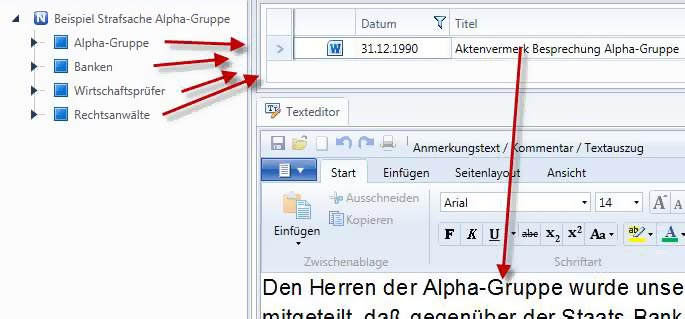
Sie können, zweitens, mehrere Textauszüge (Dokumente) an einen Strukturpunkt anbinden. Ein Beispiel bietet eine Person (= Strukturpunkt), die in mehreren Dokumenten erwähnt wird:


Schließlich können Sie, drittens, mehrere „Bänder“ an einen Strukturpunkt anbinden. Ein Beispiel bieten Klageschrift und Klageerwiderung in einem Zivilprozess, in denen sich unterschiedliche Ausführungen zu einem bestimmten Sachverhaltskomplex (= Strukturpunkt) finden. Juristen können auf diese Weise erstmals die sogenannte Relationstechnik digital unterstützen. Polizeibeamte und Strafverteidiger können mehrere Zeugenaussagen gezielt nebeneinander vergleichen und bearbeiten. Autoren können Literaturstellen auf diese Weise miteinander vergleichen …


Sie können Texte verarbeiten und erzeugen
Übersicht
Der im Manager enthaltene Texteditor bietet alle wesentlichen Möglichkeiten der IT-gestützten Textverarbeitung und zusätzliche Normfall-spezifische Möglichkeiten. Der Einsatz eines weiteren Textverarbeitungsprogrammes ist daneben im Allgemeinen nicht erforderlich.
Sie können Dateiformate wie Microsoft Word (DOC, DOCX), HMTL, RTF oder PDF direkt einfügen und öffnen Die erzeugten Texte können Sie unabhängig vom jeweiligen Normfall-Projekt in entsprechenden unterschiedlichen Dateiformaten abspeichern und auch direkt an Ihre Drucker ausgeben. Dabei können Sie Formatvorlagen verwenden, Ihren Briefbogen vorgeben, Grafiken einfügen, Tabellen bilden, Textmarken einfügen, Fuß- und Endnoten einfügen, Literaturverzeichnisse erstellen und Seitenumbrüche sowie Kopf- bzw. Fußzeilen bearbeiten u.a.m.
Im Folgenden konzentrieren wir uns auf die wichtigsten Möglichkeiten.
Die Texterstellung
Sie können im Fenster „Texteditor“ des Managers Texte schreiben oder diktieren. So entstand auch der Text, den Sie gerade lesen. In der Menüleiste darüber finden Sie Einstellmöglichkeiten für Schrift, Schriftgröße usw. Den fertigen Text können Sie speichern oder unmittelbar ausdrucken.

Das Format „RTF“ ist voreingestellt. Sie können aber auch ein anderes Format wählen, z.B. Microsoft Word.
Die gegliederte Texterstellung
Sie können auch einen gegliederten Text erstellen. Die Strukturpunkte bilden dabei eine hierarchische Gliederung, wie sie in Veröffentlichungen und Schriftsätzen üblich ist. Das folgende Beispiel zeigt die Gliederung eines Lexikonbeitrags über den Strafantrag.

Zu jedem Gliederungs- (Struktur-)Punkt schreiben/diktieren Sie den jeweils zugehörigen Text in das Textfenster.
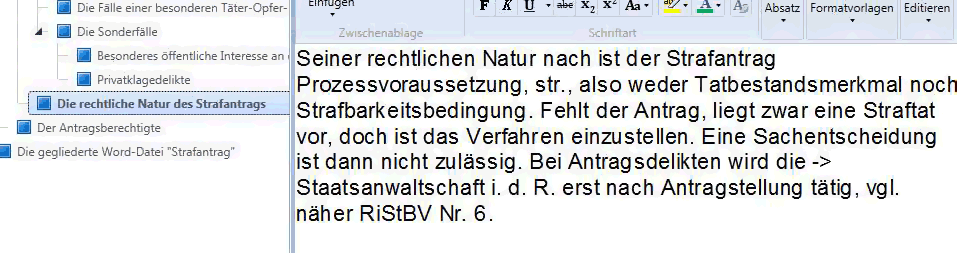
Änderungen in der Gliederung können Sie bequem vornehmen. Dabei wandert der jeweils geschriebene Text an eine andere Stelle der Gliederung (und alle angebundenen Dateien wandern mit). Wenn Sie im eben gebrachten Beispiel „Strafantrag“ die „rechtliche Natur des Strafantrags“ an den Beginn stellen wollen, ist das mit wenigen Mausklicks möglich. Das Ergebnis sieht dann so aus:

Nach getaner Arbeit exportieren Sie die Datei als gegliedertes Textdokument und speichern es oder/und drucken es aus.
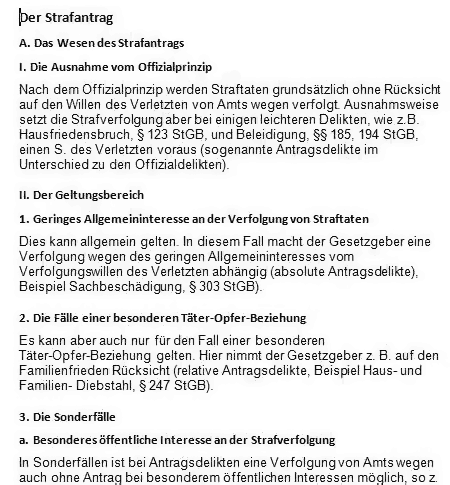
Sie können die Gliederung auch ausschalten und den Text als Fließtext ausgeben.
Der Import eines gegliederten Word-Textes
Sie können auch in umgekehrter Richtung einen Word-Text in eine strukturierte Normfall Datei umwandeln. Vorausgesetzt ist, dass die Word-Datei mit dem Gliederungssystem von Word formatiert (und nicht etwa von Hand gegliedert) ist.
Wenn beispielsweise ein solcher Schriftsatz bei Gericht oder in einer Kanzlei eingeht, erkennen Sie auf diese Weise die „Architektur“ dieses Textes und können diesen beispielsweise mit dem Relationsmodul des Managers mit Ihrem eigenen Entwurf vergleichen.
Die Nutzung von Textbausteinen
Für Routinebereiche, etwa in Justiz und Anwaltschaft, gibt es Texthandbücher, in denen fertige Texte (z.B. Anklageschrift, Haftbeschwerden, Kostenerstattungsantrag, …) bereitgestellt werden. Mit dem Manager können Sie einen Schritt weiter gehen und Textbausteine bilden und nutzen, die Sie dann im Baukastensystem in Ihre Texte einfügen.
Beispielsweise gibt es viele Rechtsbegriffe wie „geringe Schuld“ oder „öffentliches Interesse“, zu denen standardisierte Formeln existieren, welche die Rechtsprechung entwickelt hat. Diese können Sie im Wissensmanagement-Modul des Managers z.B. bei den entsprechenden Paragraphen der Gesetze speichern (und pflegen) und in relevante Schriftstücke einfügen.
Die Erstellung von Fußnoten und Literaturverzeichnissen
Mit dem Manager können Sie Fußnoten und Endnoten sowohl nach dem deutschen System (unterhalb der Seite oder am Ende des Textes) oder nach dem Harvard-System (im Text in Klammern eingefügt) sowie Literaturverzeichnisse erstellen. Die Fußnoten werden im Textfenster des Texteditors geschrieben. Sie können diese jederzeit in einer Liste ansehen, so dass das Auffinden der jeweils zugehörigen Textstellen und der Verweis auf bereits vorhandene Fußnoten („siehe…aaO“) möglich sind.
Für Literaturnachweise existieren Zitiermethoden. So wird ein längerer Titel abgekürzt, also statt „Haft, Strafrecht Allgemeiner Teil, 9. Aufl. München 2012“ heißt es in der Fußnote „Haft, AT…“ Sie können das Schlagwortmodul des Managers nutzen, um diese Kurzfassungen als Schlagworte zu erfassen. In einer alphabetisch geordneten Schlagwortliste können Sie dann das passende Schlagwort anklicken und als Fußnote weiter bearbeiten.

Nach Fertigstellung des Textes erhalten Sie dann per Mausklick ein vollständiges Literaturverzeichnis.